The Declarative Deployment pattern provides a deployment framework and enables the creation, upgrade and rollback processes of a group of containers making execution a repeatable and automated activity.
How to handle deployments
Upgrading a service to a next version involves activities such as starting the new version of the Pod, stopping the old version of a Pod gracefully, waiting and verifying that it has launched successfully, and sometimes rolling it all back to the previous version in the case of failure.
These activities are performed either by allowing some downtime but no running concurrent service versions, or with no downtime, but increased resource usage due to both versions of the service running during the update process.
Performing these steps manually can lead to human errors, and scripting properly can require significant work which is often duplicated unnecessarily.
Patterns for deployment
The pattern defines how an application is deployed, updated and or removed. As part of continuous delivery (CD), an application will be deployed many times per release lifecycle.
Rolling Update
The rolling update strategy is a declarative way to update applications and supports two strategies;
RollingUpdate(default)Recreate
apiVersion: apps/v1
kind: Deployment
metadata:
  name: random-generator
spec:
  replicas: 3                                              << #1
  strategy:
    type: RollingUpdate
    rollingUpdate:
      maxSurge: 1                                          << #2
      maxUnavailable: 1                                    << #3
    selector:
      matchLabels:
        app: random-generator
    template:
      metadata:
        labels:
          app: random-generator
      spec:
        containers:
        - image: k8spatterns/random-generator:1.0
          name: random-generator
          readinessProbe:                                 << #4
            exec:
command: [ "stat", "/random-generator-ready" ]- We want three replicas, you need more than one replica for a
RollingUpdate - Number of Pods that can be run temporarily in addition to the replicas specified during an update. In this case, we can run one extra pod.
- The maximum number of Pods that can be unavailable during the
RollingUpdate. Here it could be that only two Pods are available at a time during the update. - Readiness probes are used to determine if the RollingUpdate can only progress to the next pod when we are healthy and good to go on.
RollingUpdate ensures no downtime during the update process. Under the hood, the deployment implementation creates a new ReplicaSet and replaces old containers with new ones. The control the rate of a new container rollout can also be controlled by changing the range of available and excess Pods using maxSurge and maxUnavailable.

There are three options for triggering a RollingUpdate;
- Replace – replace the deployment with a new one using
kubectl replace - Patch – patch the deployment with new settings such as image name using
kubectl patch - New Image – Set a new image name for the deployment using
kubectl set image
Strategies for Application Deployment
Listed below are examples of usage adopted for deploying Verne:
- recreate: terminate the old version and release the new one
- ramped: release a new version on a rolling update fashion, one after the other
Recreate – Best for development
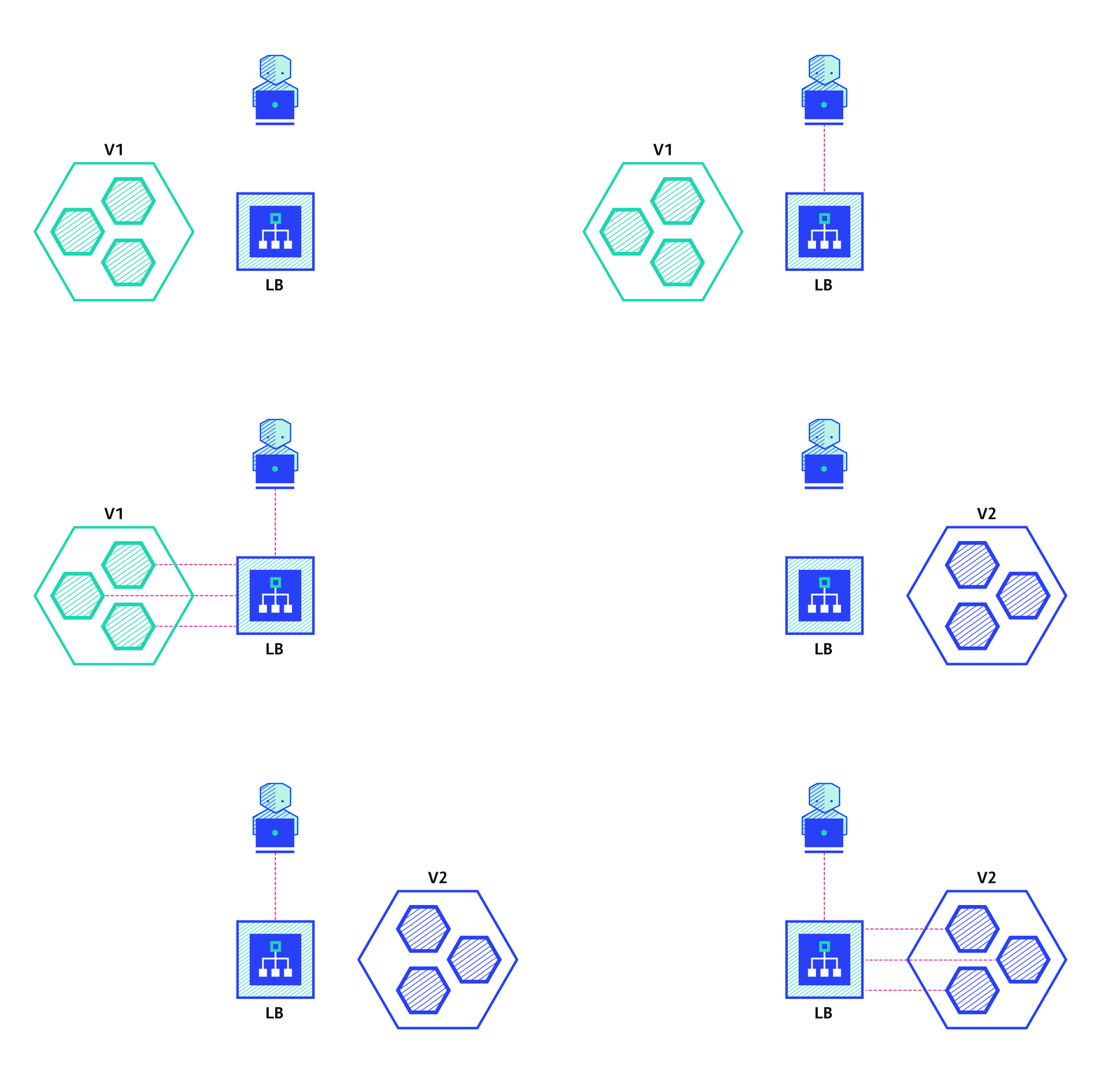
The recreate strategy is a dummy deployment which consists of shutting down version A then deploying version B after version A is turned off. This technique implies downtime of the service that depends on both shutdown and boot duration of the application.
| Pros | Cons |
|---|---|
| Easy to setup. | Application state entirely renewed. |
| High impact on the user, expect downtime that depends on both shutdown and boot duration of the application. |
Ramped – slow rollout
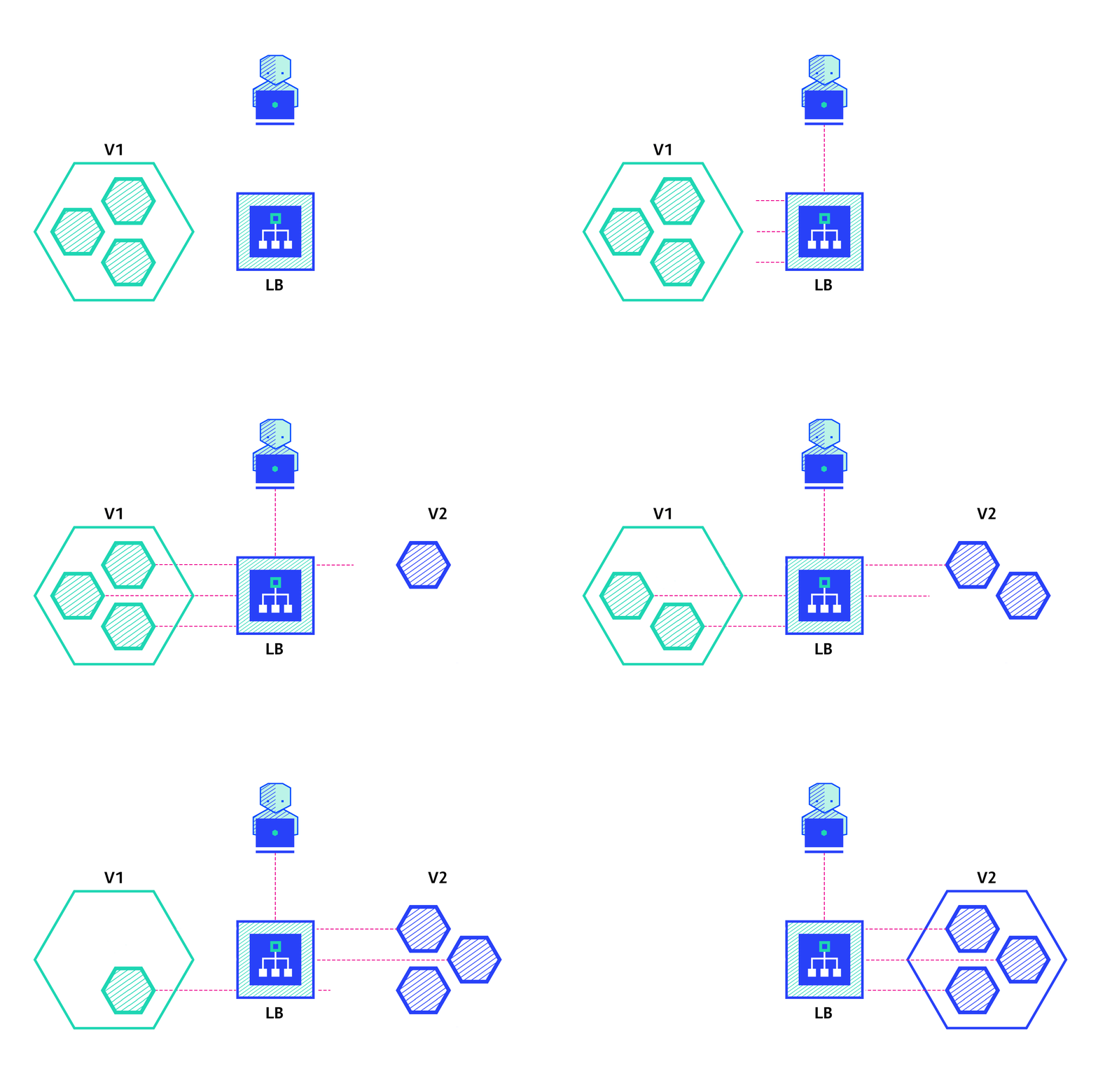
The ramped deployment strategy consists of slowly rolling out a version of an application by replacing instances one after the other until all the instances are rolled out. It usually follows the following process: with a pool of version A behind a load balancer, one instance of version B is deployed. When the service is ready to accept traffic, the instance is added to the pool. Then, one instance of version A is removed from the pool and shut down.
Depending on the system taking care of the ramped deployment, you can tweak the following parameters to increase the deployment time:
- Parallelism, max batch size: Number of concurrent instances to rolling out.
- Max surge: How many instances to add in addition to the current amount.
- Max unavailable: Number of unavailable instances during the rolling update procedure.
| Pros | Cons |
|---|---|
| Easy to set up. | Rollout/rollback can take time. |
| Version is slowly released across instances. | Supporting multiple APIs is hard. |
| Convenient for stateful applications that can handle rebalancing of the data. | No control over traffic. |
Blue/Green – best to avoid API versioning issues
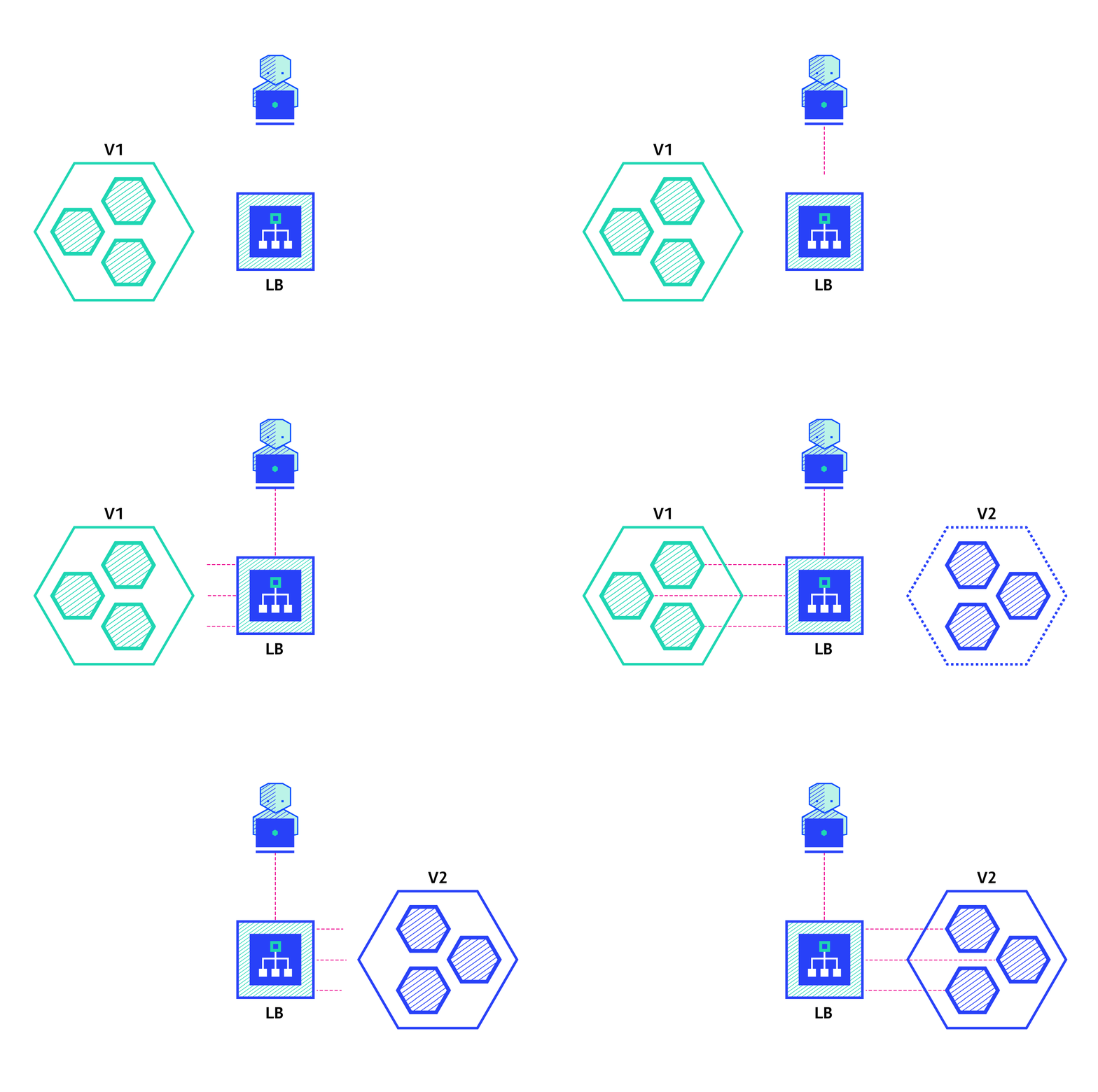
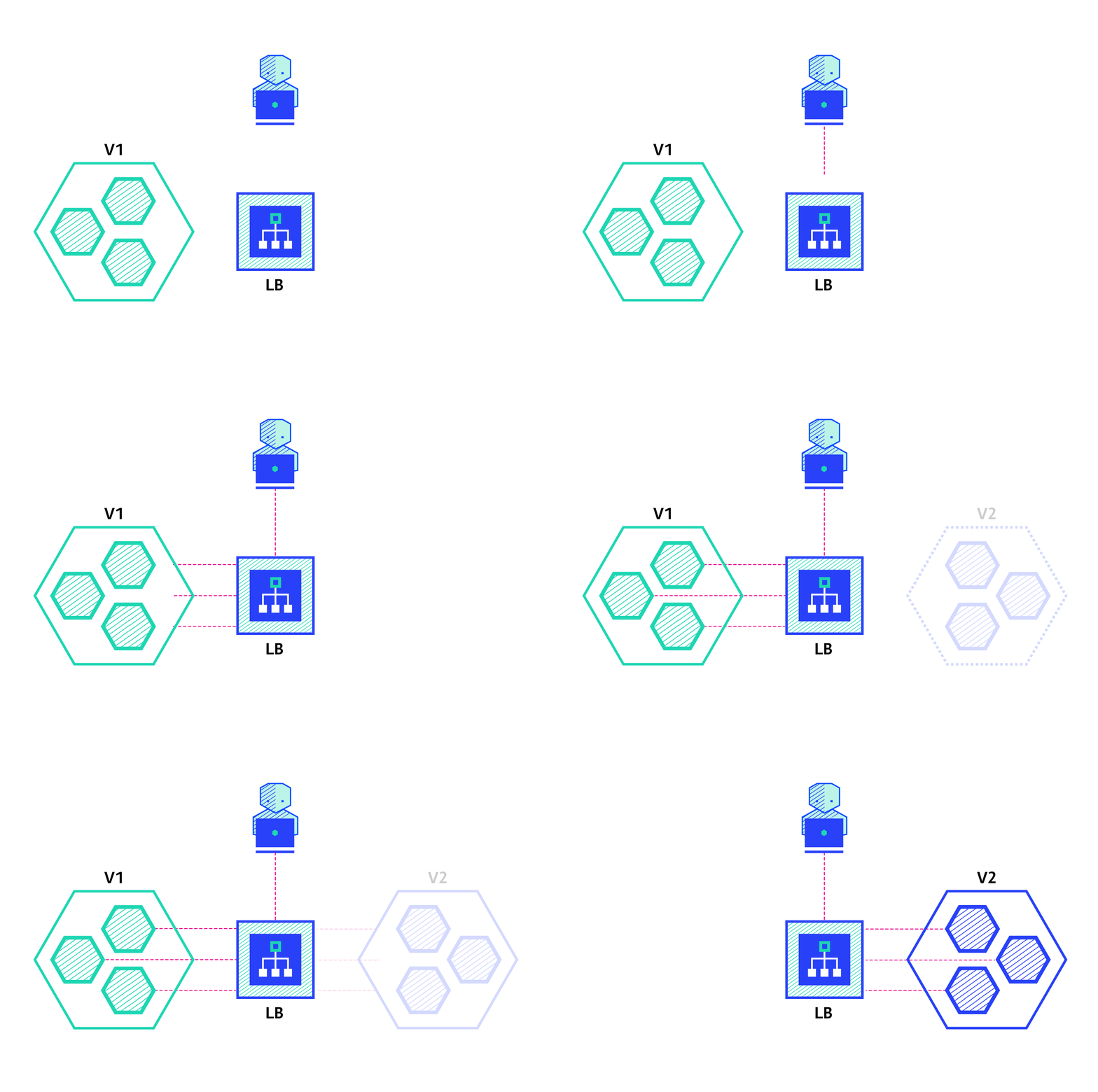
The blue/green deployment strategy differs from a ramped deployment, version B (green) is deployed alongside version A (blue) with exactly the same amount of instances. After testing that the new version meets all the requirements the traffic is switched from version A to version B at the load balancer level.
| Pros | Cons |
|---|---|
| Instant rollout/rollback. | Expensive as it requires double the resources. |
| Avoid versioning issue, the entire application state is changed in one go. | A proper test of the entire platform should be done before releasing to production. |
| Handling stateful applications can be hard. |
Canary – let end users do testing
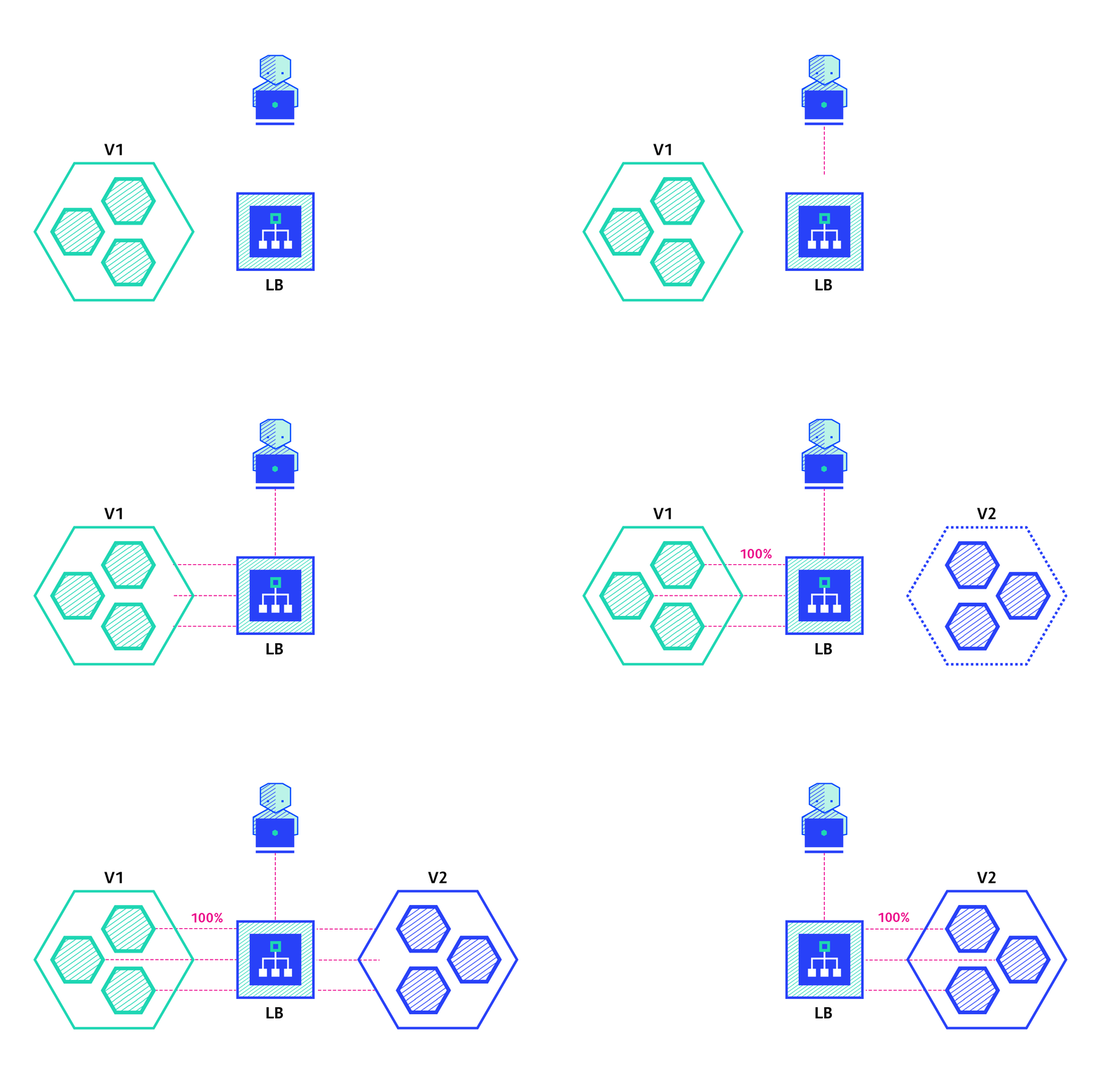
A canary deployment consists of gradually shifting production traffic from version A to version B. Usually the traffic is split based on weight. For example, 90% of the requests go to version A, 10% goes to version B.
This technique is mostly used when the tests are lacking or not reliable or if there is little confidence in the stability of the new release on the platform.
| Pros | Cons |
|---|---|
| Version released for a subset of users. | Slow rollout. |
| Convenient for error rate and performance monitoring. | |
| Fast rollback. |
A/B testing – best for feature testing on a subset of users
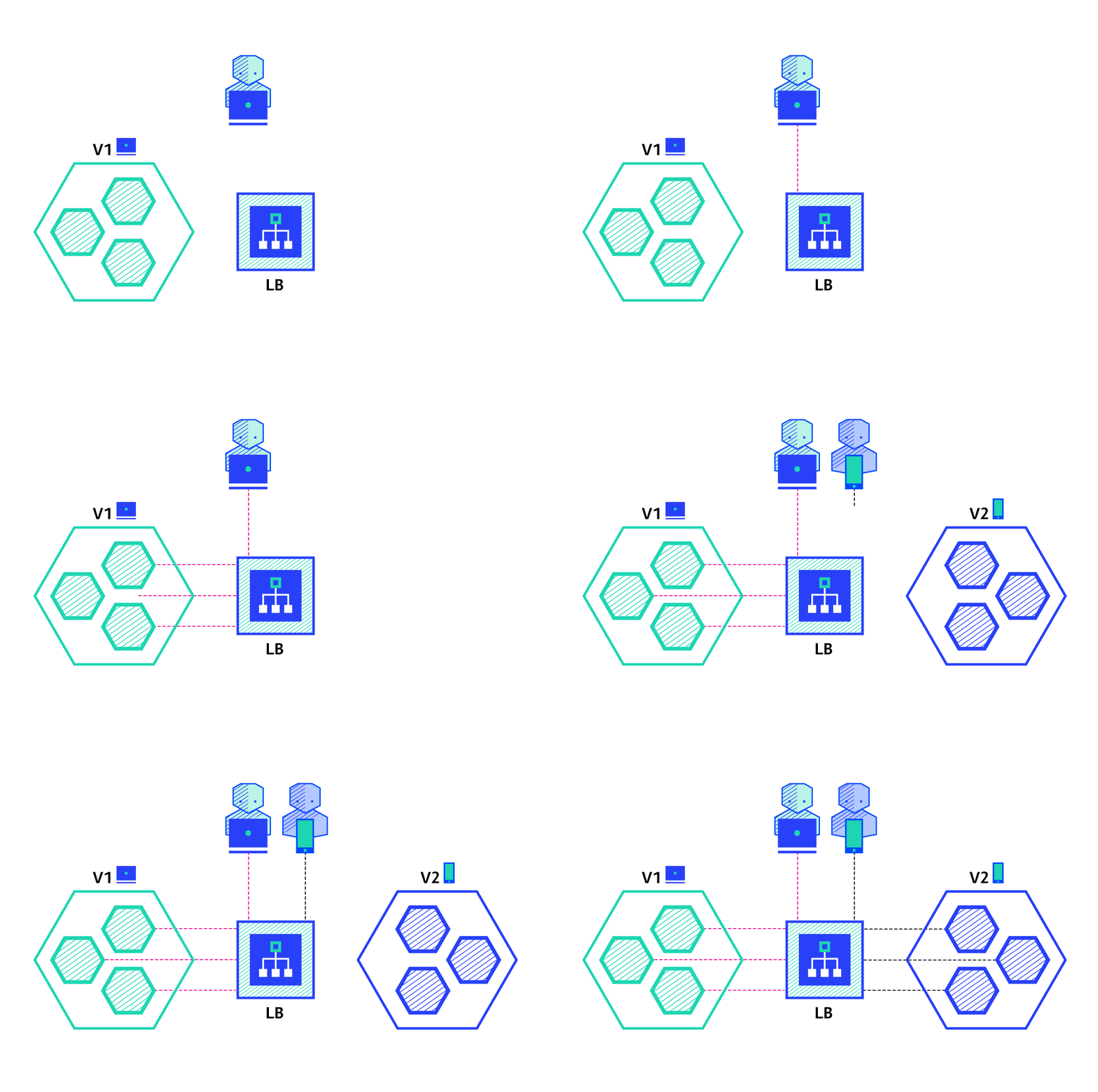
A/B testing deployments consist of routing a subset of users to a new functionality under specific conditions. It is usually a technique for making business decisions based on statistics, rather than a deployment strategy. However, it is related and can be implemented by adding extra functionality to a canary deployment so we will briefly discuss it here.
This technique is widely used to test conversion of a given feature and only roll-out the version that converts the most.
Here is a list of conditions that can be used to distribute traffic amongst the versions:
- By browser cookie
- Query parameters
- Geolocalisation
- Technology support: browser version, screen size, operating system, etc.
- Language
| Pros | Cons |
|---|---|
| Several versions run in parallel. | Requires intelligent load balancer. |
| Full control over the traffic distribution. | Hard to troubleshoot errors for a given session, distributed tracing becomes mandatory. |
Shadow
A shadow deployment consists of releasing version B alongside version A, fork version A’s incoming requests and send them to version B as well without impacting production traffic. This is particularly useful to test the production load of a new feature. A rollout of the application is triggered when stability and performance meet the requirements.
This technique is fairly complex to set up and needs special requirements, especially with egress traffic. For example, given a shopping cart platform, if you want to shadow test the payment service you can end-up having customers paying twice for their order. In this case, you can solve it by creating a mocking service that replicates the response from the provider.
| Pros | Cons |
|---|---|
| Performance testing of the application with production traffic. | Expensive as it requires double the resources. |
| No impact on the user. | Not a true user test and can be misleading. |
| No rollout until the stability and performance of the application meets the requirements. | Complex to set up. |
| Requires mocking service for certain cases. |

