The Health Probe Pattern defines how the application reports its health state and is not only about whether the pod is up and running, but also whether it is capable of receiving and responding to requests. The Health Probe pattern is about how an application can communicate its health state to Kubernetes. The High Observability Principle is one of the container-based application design principles. To be fully automatable, a cloud-native application must be highly observable by allowing its state to be observed so that Kubernetes can detect whether the application is up and whether it is ready to serve requests. These observations influence the lifecycle management of Pods and the way traffic is routed to the application.
Detecting application health
Kubernetes uses the health probe to check the container process status and restarts it if issues are detected. The idea of the health probe is to indicate if the application is healthy (or not) and more importantly is the ability to serve requests.
In practice checking the process status is not sufficient to decide about the health of an application. An application can hang but is still up and running, for example, a Java application may throw an OutOfMemoryError and still have the JVM process running. Or, an application may freeze because it runs into an infinite loop, deadlock, or some thrashing (cache, heap, process).
To detect these kinds of situations, Kubernetes needs a reliable way to check the health of applications and the ability to know whether the application is functioning as expected and capable of serving requests.
Types of health checks
Kubernetes gives you two types of health checks, and it is important to understand the differences and their uses.
Readiness
Readiness probes are designed to indicate if the application is ready to serve traffic.
Kubernetes makes sure the readiness probe passes before allowing a service to send traffic to the pod.
If a readiness probe starts to fail, Kubernetes stops sending traffic to the pod until it passes.
Liveness
Liveness probes let Kubernetes know if your app is alive or dead.
If the application is alive, then Kubernetes leaves it alone. If the application is dead, Kubernetes removes the Pod and starts a new one to replace it.
Readiness
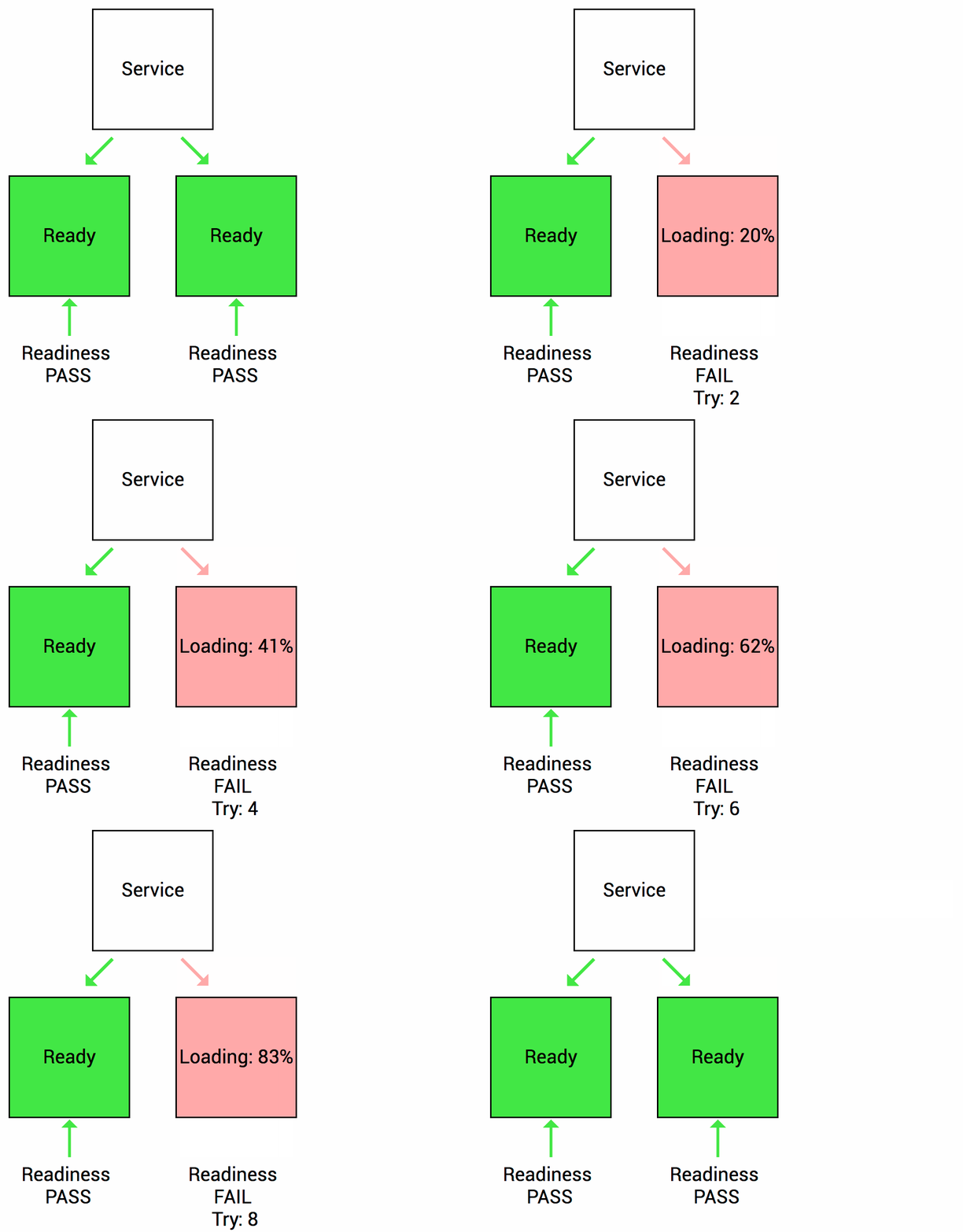
Let’s imagine the application takes a minute to warm up and start. Your service won’t work until it is up and running, even though the process has started.
You will also have issues if you want to scale up this deployment to have multiple copies. A new copy shouldn’t receive traffic until it is fully ready, but by default, Kubernetes starts sending it traffic as soon as the process inside the container starts.
By using a readiness probe, Kubernetes waits until the application is fully started before it allows the service to send traffic to the new copy.
Liveness
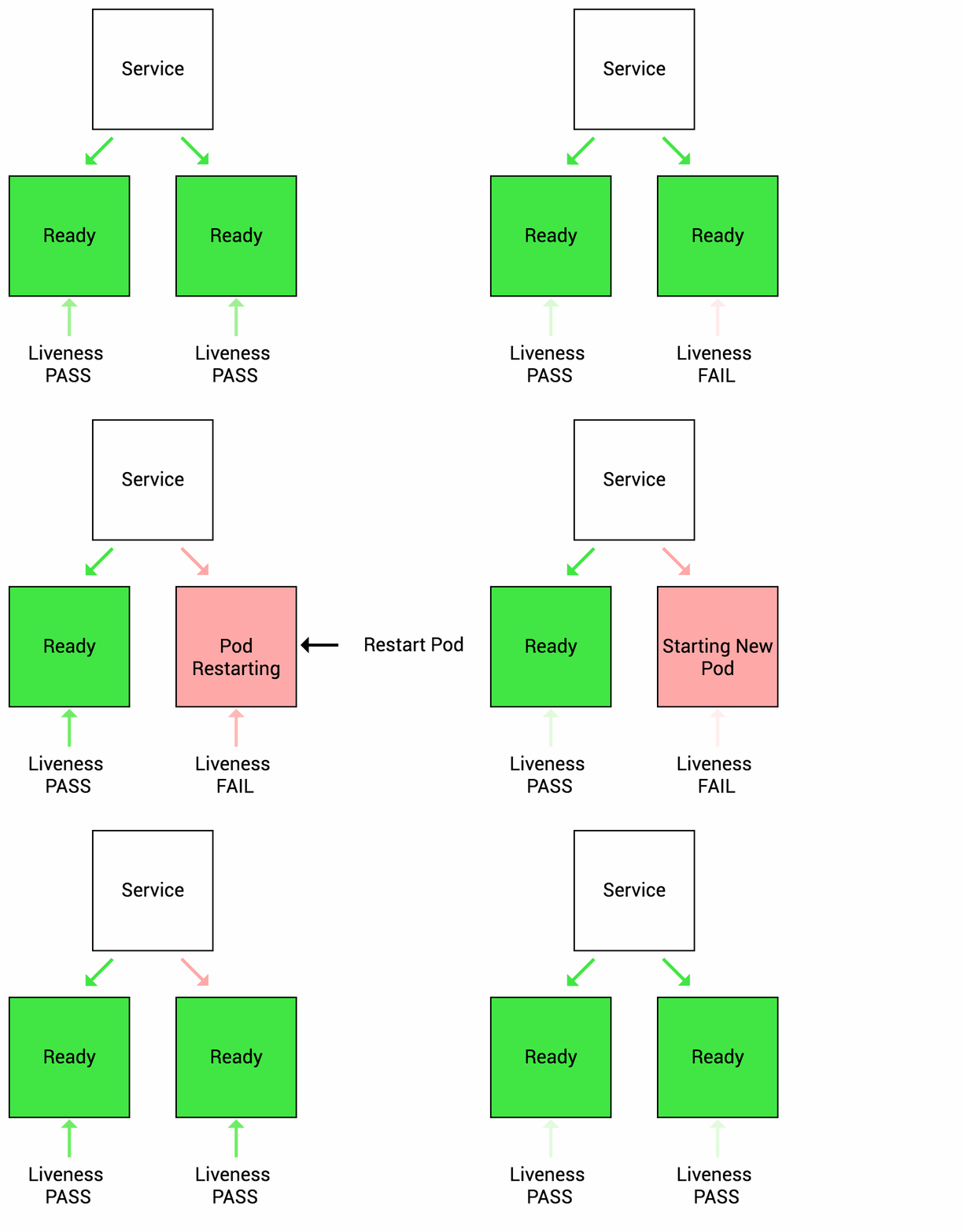
Let’s imagine another scenario where your app has a nasty case of deadlock or OutOfMemoryError, causing it to hang indefinitely and stop serving requests.
Because the process continues to run, by default Kubernetes thinks that everything is fine and continues to send requests to the broken pod.
By using a liveness probe, Kubernetes detects that the app is no longer serving requests and restarts the offending pod.
Example Readiness and Liveness Probe
# Deployment for starting up the random-generator with liveness and readiness probes
apiVersion: apps/v1
kind: Deployment
metadata:
  name: random-generator
spec:
  replicas: 1
  selector:
    matchLabels:
      app: random-generator
  template:
    metadata:
      labels:
        app: random-generator
    spec:
      containers:
      - image: k8spatterns/random-generator:1.0
        name: random-generator
        env:
        # Tell random-generator to wait 20 seconds when starting up
        - name: DELAY_STARTUP
          value: "20"
        ports:
        - containerPort: 8080
          protocol: TCP
        livenessProbe:
          # Spring Boot's actuator comes in handy as a liveness probe check
          # You can use the endpoint "/toggle-heath" to toggle the health state
          httpGet:
            path: /actuator/health
            port: 8080
          # How long to wait until the liveness check should kick it.
          initialDelaySeconds: 30
        readinessProbe:
          # We are checking for a file created by our app when its ready
          exec:
            command: [ "stat", "/opt/random-generator-ready" ]
