Overview
By default, ElasticSearch does not enable authentication or access control. This document describes using Role-Based Access Control (RBAC) with ElasticSearch, what users and roles are used for developers and configurators along with how this model is used in deployed environments. It is also important to note that due to cost implications of required licenses to use LDAP/AD integration the security model will not cover direct LDAP/AD integration.
Intended Audience
The main intended audience for this document is the DevOps team who will be implementing the components. Other audiences include Architects, Project managers, developer leads, developers and configurators.
Layered Security Model
The aim is to provide a security framework that can be used to provide authentication, access control to ElasticSearch and support the various tasks associated with support while also supporting developers and configurators. The intention is for all consumers of ElasticSearch services to leverage the same model with the only difference being what users are created in each deployment, local, on-premise or cloud. For example, for developers and configurators working locally, the design will seed a set of users against the required roles.

Levels of access
We have six layers of required access that reflects the different activities performed by the different groups:
- Super user access – provides access to the operations and all the resources using the built-role superuser.
- Application access – provides access to the Catalyst indexes and dashboards with readWrite.
- Support access – provides support access to the Catalyst indexes and dashboards with read-only.
- Dashboard access – provides access to the Catalyst indexes and dashboards with read-only.
By leveraging built in roles we define user roles to provide the required access control.
Please see https://www.elastic.co/guide/en/elastic-stack-overview/6.8/built-in-roles.html for more details on Elastic Search built-in roles.
Access Control – Roles
Here is an overview of the access roles and leveraged built-in roles
Super User Role
Grants full access to the cluster, including all indices and data. A user with the superuser role can also manage users and roles and impersonate any other user in the system. The intended users of this role are ElasticSearch administrators.
Due to the permissive nature of this role, take extra care when assigning it to a user.
Application Server Role
This role is for use by the application and enables access to the Catalyst indexes using the all privilege.
The all privilege provides the following on Catalyst indexes:
create | Privilege to index documents. Also grants access to the update mapping action.This privilege does not restrict the index operation to the creation of documents but instead restricts API use to the index API. The index API allows a user to overwrite a previously indexed document. |
create_index | Privilege to create an index. A create index request may contain aliases to be added to the index once created. In that case the request requires the manage privilege as well, on both the index and the aliases names. |
delete | Privilege to delete documents. |
delete_index | Privilege to delete an index. |
index | Privilege to index and update documents. Also grants access to the update mapping action. |
manage | All monitor privileges plus index administration (aliases, analyze, cache clear, close, delete, exists, flush, mapping, open, force merge, refresh, settings, search shards, templates, validate). |
manage_follow_index | All actions that are required to manage the lifecycle of a follower index, which includes creating a follower index, closing it, and converting it to a regular index. This privilege is necessary only on clusters that contain follower indices. |
manage_ilm | All index lifecycle management operations relating to managing the execution of policies of an index This includes operations like retrying policies, and removing a policy from an index. |
manage_leader_index | All actions that are required to manage the lifecycle of a leader index, which includes forgetting a follower. This privilege is necessary only on clusters that contain leader indices. |
monitor | All actions that are required for monitoring (recovery, segments info, index stats and status). |
read | Read only access to actions (count, explain, get, mget, get indexed scripts, more like this, multi percolate/search/termvector, percolate, scroll, clear_scroll, search, suggest, tv). |
read_cross_cluster | Read only access to the search action from a remote cluster. |
view_index_metadata | Read-only access to index metadata (aliases, aliases exists, get index, exists, field mappings, mappings, search shards, type exists, validate, warmers, settings, ilm). This privilege is primarily available for use by Kibana users. |
write | Privilege to perform all write operations to documents, which includes the permission to index, update, and delete documents as well as performing bulk operations. Also grants access to the update mapping action. |
Please see https://www.elastic.co/guide/en/elastic-stack-overview/6.8/security-privileges.html#privileges-list-indices for more details on Elastic Search privileges.
Support Role
This role is for use by the application and enables access to the Catalyst indexes using the read privilege.
The read privilege provides the following on Catalyst indexes:
read | Read only access to actions (count, explain, get, mget, get indexed scripts, more like this, multi percolate/search/termvector, percolate, scroll, clear_scroll, search, suggest, tv). |
Please see https://www.elastic.co/guide/en/elastic-stack-overview/6.8/security-privileges.html#privileges-list-indices for more details on Elastic Search privileges.
Dashboard Role
This role is a built-in role and grants access to the Kibana Dashboard and read-only permissions to Kibana. This built-in read role provides the ability to the user to access reports and does not have access to editing tools in Kibana.
The kibana_dashboard_only_user built-in role limits what users see when they logged into Kibana. The kibana_dashboard_only_user role is preconfigured with read-only permissions to Kibana.
Users assigned this role are only able to see the Dashboard app in the navigation pane. When users open a dashboard, they will have limited visual experience. All edit and create controls are hidden.
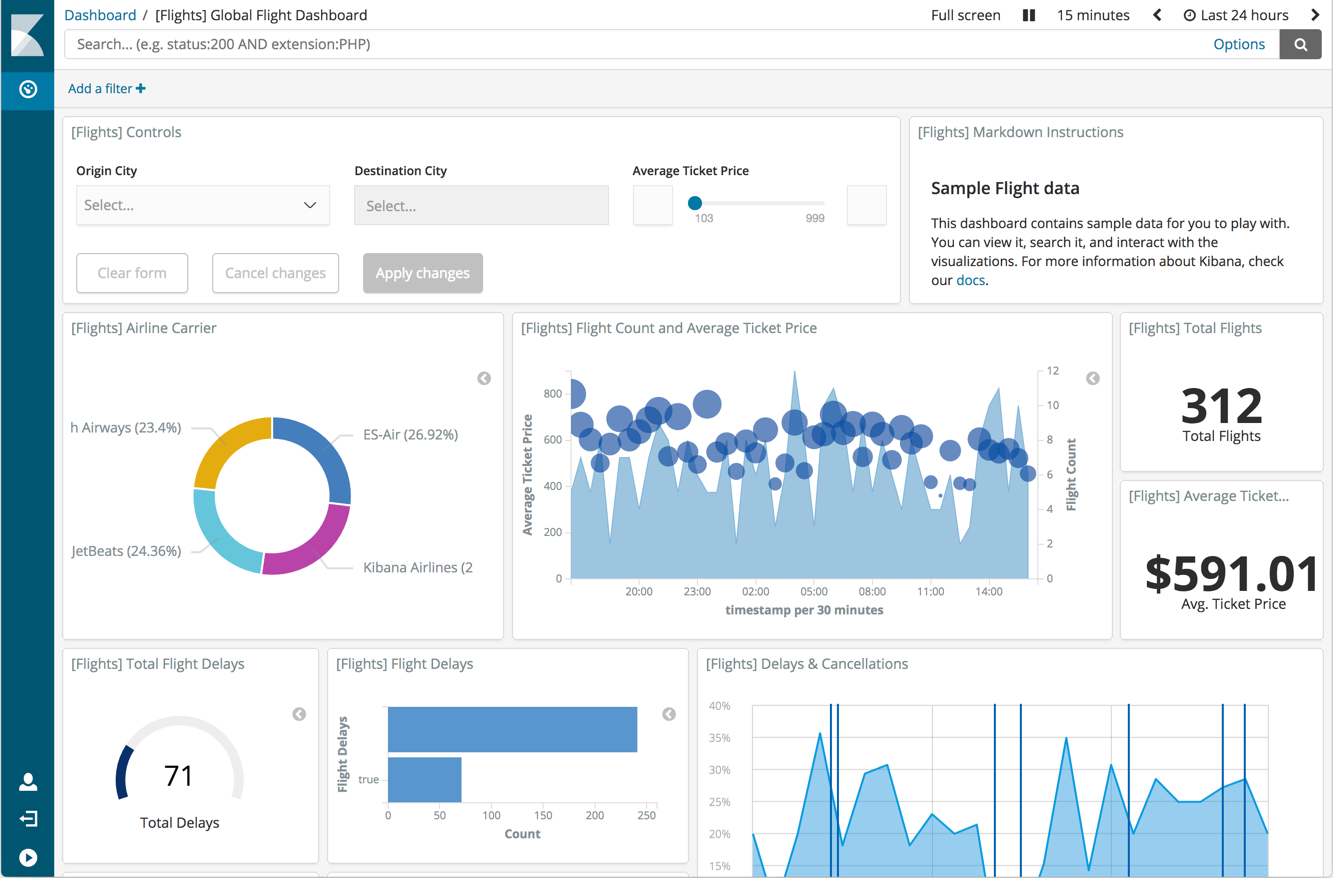
For more information, see Kibana Dashboard Only Mode.
Authentication – Users
Username Standards
These are the username format standards.
| User | Username Format |
|---|---|
| Super User Elastic | elastic |
| Super Users | <firstname>.<lastname>.admin |
| Application User | catalyst |
| Support User | <firstname>.<lastname>.support |
| Dashboard | <firstname>.<lastname>.dashboard |

